imagecolorallocatealpha
(PHP 4 >= 4.3.2, PHP 5)
imagecolorallocatealpha — Allocate a color for an image
Descripción
imagecolorallocatealpha() behaves identically to imagecolorallocate() with the addition of the transparency parameter alpha .
Lista de parámetros
- image
-
An image resource, returned by one of the image creation functions, such as imagecreatetruecolor().
- red
-
Value of red component
- green
-
Value of green component
- blue
-
Value of blue component
- alpha
-
A value between 0 and 127. 0 indicates completely opaque while 127 indicates completely transparent.
Valores retornados
A color identifier or FALSE if the allocation failed.
Registro de cambios
| Versión | Descripción |
|---|---|
| Prior to 5.1.3 | Returns -1 if the allocation failed. |
Ejemplos
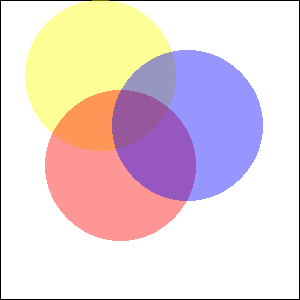
Example#1 Example of using imagecolorallocatealpha()
<?php
$size = 300;
$image=imagecreatetruecolor($size, $size);

// something to get a white background with black border
$back = imagecolorallocate($image, 255, 255, 255);
$border = imagecolorallocate($image, 0, 0, 0);
imagefilledrectangle($image, 0, 0, $size - 1, $size - 1, $back);
imagerectangle($image, 0, 0, $size - 1, $size - 1, $border);

$yellow_x = 100;
$yellow_y = 75;
$red_x    = 120;
$red_y    = 165;
$blue_x   = 187;
$blue_y   = 125;
$radius   = 150;

// allocate colors with alpha values
$yellow = imagecolorallocatealpha($image, 255, 255, 0, 75);
$red    = imagecolorallocatealpha($image, 255, 0, 0, 75);
$blue   = imagecolorallocatealpha($image, 0, 0, 255, 75);

// drawing 3 overlapped circle
imagefilledellipse($image, $yellow_x, $yellow_y, $radius, $radius, $yellow);
imagefilledellipse($image, $red_x, $red_y, $radius, $radius, $red);
imagefilledellipse($image, $blue_x, $blue_y, $radius, $radius, $blue);

// don't forget to output a correct header!
header('Content-type: image/png');

// and finally, output the result
imagepng($image);
imagedestroy($image);
?>
El resultado del ejemplo seria algo similar a:
Notes
Note: Esta funcion requiere GD 2.0.1 o posterior.